INTEXT QUESTIONS Page no: 10
Question: 1. What are the five basic operations performed by the computer?
Answer: The five basic operations are:
- Input – Entering data and programs into the computer system.
- Storage – Saving data and instructions for use.
- Processing – Processing data as required by the user.
- Output – Producing results from the data to get useful information.
- Control – Controlling all operations inside the computer (done by the Control Unit).
Question: 2. Define ALU, CU and CPU.
Answer:
- ALU (Arithmetic Logic Unit): The unit that performs major operations such as addition, subtraction, multiplication, division, logic and comparison.
- CU (Control Unit): The unit that supervises input, output, processing and storage. It decides when to start receiving data, when to stop, and where to store data. It takes care of step-by-step processing of all operations inside the computer.
- CPU (Central Processing Unit): The ALU and CU of a computer system are jointly known as the CPU. It is called the brain of the computer system.
Question: 3. Choose the correct answer.
(a) The task of performing arithmetic and logical operations is called:
(i) ALU
(ii) editing
(iii) storage
(iv) Output
Answer: (i) ALU.
(b) The ALU and CU jointly are known as:
(i) RAM
(ii) ROM
(iii) CPU
(iv) None of above
Answer: (iii) CPU.
(c) The process of producing results from the data for getting useful information is called:
(i) output
(ii) input
(iii) processing
(iv) storage
Page no: 11
Question: 4. Write True or False for the following:
(a) Mouse is an output device.
Answer: False — The mouse is an input device used to point, select, and click.
(b) OCR stands for Optical Content Reader.
Answer: False — OCR stands for Optical Character Recognition, used (for example, by banks) to convert scanned images of typed or printed pages into editable text.
(c) LCD Monitor is used in notebook computer.
Answer: True — LCD monitors are flat panel displays, commonly used in notebook computers.
(d) Speed of DOT Matrix Printer is measured in Characters Per Second.
Answer: True — A dot matrix printer’s speed is measured in CPS (characters per second)
(e) Plotters are used to produce high quality drawings and images, such as construction plans for buildings or blueprints for mechanical objects.
Answer: True — Plotters are designed to produce large drawings such as construction plans and mechanical blueprints.
Page no: 16
5. Write True or False for the following:
(a) Operating System (OS) is an Application Software.
Answer: False — An Operating System is system software, not application software. It runs the computer, manages hardware devices, and supports application programs.
(b) High level languages are easy to program than low level language.
Answer: True — High level languages use English-like, easy-to-understand statements and are machine independent, so programming is simpler than with machine or assembly language.
(c) Computer language FORTRAN is used to solve Scientific and Mathematical problems.
Answer: True — FORTRAN (Formula Translation) was developed for solving mathematical and scientific problems and is popular in the scientific community.
(d) C is an object oriented programming language.
Answer: False — C is a structured programming language used for general purposes. It is C++ that is the popular object-oriented programming language.
(e) Compiler converts high level languages into machine language.
Answer: True — A compiler reads a program written in a high level language (source program) and translates it into an equivalent program in machine language (object program).
1.11 TERMINAL QUESTIONS Page no: 16
Question: 1. What is a computer? Draw a block diagram to illustrate the basic organisation of a computer system and explain the functions of various units.
Answer: Definition: A computer is a device that transforms data into meaningful information. It can (i) accept data, (ii) store data, (iii) process data as desired, (iv) retrieve stored data as and when required, and (v) print the result in the desired format. Its major characteristics are high speed, accuracy, diligence, versatility and storage.
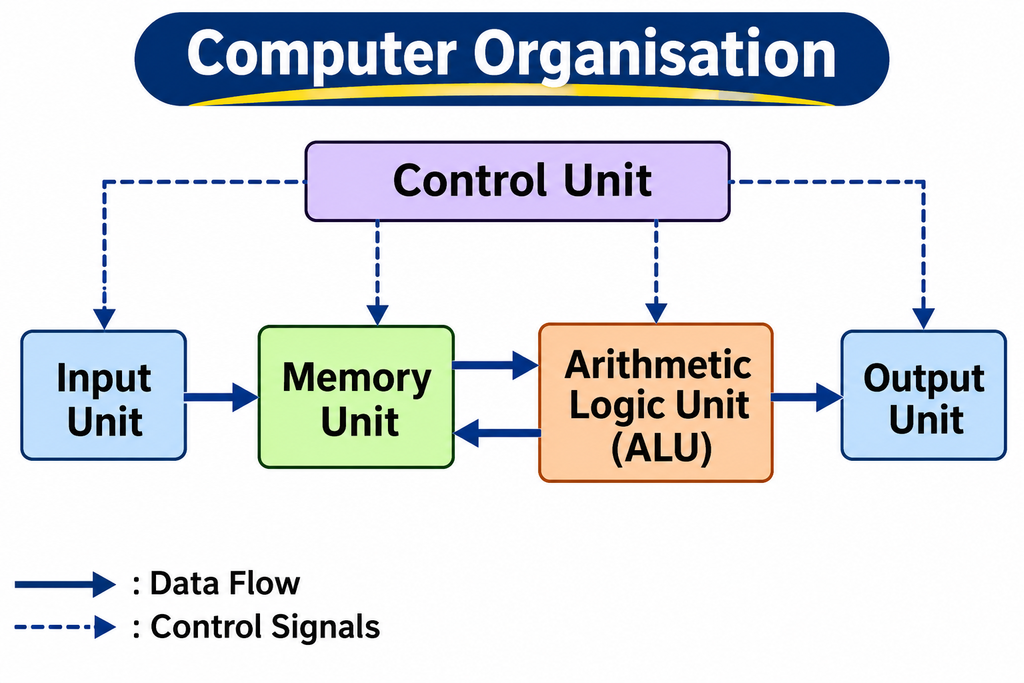
Functions of the various units:
- Input Unit: This is the process of entering data and programs into the computer system.
- Control Unit (CU): It supervises input, output, processing and storage. It decides when to start receiving data, when to stop it, where to store data, etc., and takes care of step-by-step processing of all operations inside the computer.
- Memory Unit: It is used to store data and instructions.
- Arithmetic Logic Unit (ALU): It performs major operations such as addition, subtraction, multiplication, division, logic and comparison.
- Output Unit: This is the process of producing results from the data to get useful information.
The ALU and CU together are called the Central Processing Unit (CPU), which may be called the brain of the computer system.
Question: 2. What is an input device? Briefly describe various important input devices.
Answer: Definition: Input devices accept data and instructions from the user and feed them into the computer.
Important input devices:
- Keyboard: The most common input device. The keyboard in most common use is the QWERTY board; a standard keyboard generally has 104 keys. Cursor control keys are duplicated to allow easier use of the numeric pad.
- Mouse: An electro-mechanical, hand-held pointing device used for selecting menu commands, moving icons, resizing windows, starting programs and choosing options. Traditional mice use a magnetically coated ball to detect movement; optical or laser mice are now common. It replaces hard-to-remember key combinations with easier “Point and Click” actions, but cannot substitute all keyboard operations.
- Light Pen: Uses a light-sensitive detector to select objects on a display screen. Like a mouse, it can move the pointer, but you point directly at objects on the screen with the pen.
- Optical/Magnetic Scanner: Used for automatic data collection, eliminating manual data entry. An image scanner translates printed images into an electronic format that can be stored in the computer’s memory. A bar-code reader is a special type of image scanner. An OCR (Optical Character Recognition) device, used by banks, converts a scanned image of a typed or printed page into editable text.
- Touch Screen: Input is given through the monitor itself; users touch electronic buttons displayed on the screen.
- Microphone: Takes voice as input. Voice communication is more error-prone than keyboard input. Two types are available: desktop microphone and hand-held microphone.
- Track Ball: A pointing device, like a mouse lying on its back. You rotate the ball with your thumb, fingers or palm to move the pointer. It is stationary, needs little space, and can be placed on any surface, making it popular for portable computers.
Question: 3. Discuss two basic types of monitors CRT and LCD.
Answer: The monitor is perhaps the most important output device because people interact with it more intensively than with other output devices. Information processed within the CPU that needs to be displayed is sent to the video adapter card, which converts it into a format the monitor can display, in the same manner as a television displays information sent by a cable service.
The two basic types of monitors used with microcomputers are:
- CRT (Cathode Ray Tube) Monitor: This is the typical monitor seen on desktop computers. It looks a lot like a television screen and works the same way. It uses a large vacuum tube called the cathode ray tube.
- LCD (Liquid Crystal Display) Monitor: Also known as a flat panel monitor. Most LCD monitors employ liquid crystal displays to render images. These days LCD monitors are very popular.
Resolution: When talking about monitor capabilities, a critical statistic is resolution. Most monitors have a resolution of at least 800×600 pixels. High-end monitors can have resolutions of 1024×768 pixels or even 1280×1024 pixels. Monitors are thus available in low resolution or high resolution.
Page no: 17
Question: 4. What is software? Discuss its various categories with the help of a diagram.
Answer: Software is a set of programs (instructions) that makes the hardware perform a particular set of tasks in a particular order. A computer cannot do anything on its own — the user gives it a set of instructions in a particular sequence, and software carries out those instructions using the hardware.
Classification of Software:

1. System Software
- Sets of programs responsible for running the computer, controlling its operations, and managing computer resources.
- Operating System (OS): Provides an interface for the user to communicate with the computer, manages hardware devices (disk drives, keyboard, monitor), maintains disk file systems, and supports application programs. Examples: UNIX, Windows, Linux.
- Utilities: Programs that bridge the gap between the OS functionality and users’ needs — e.g., compress (zip)/uncompress (unzip) software, antivirus software, file split-and-join software.
2. Application Software
- Programs written to perform specific tasks, e.g., a library information system (book details, issue/return records) or a student information system (roll number, name, results processing).
- (a) Generalized Packages: User-friendly software for general needs such as preparing documents, drawing, managing data, presentations, and games. Examples:
- Word processing: MS-Word, OpenOffice.org Writer
- Spreadsheets: MS-Excel, OpenOffice.org Calc
- Presentations: MS-PowerPoint, OpenOffice.org Impress
- Database Management: MS-Access, ORACLE
- Graphics tools: Adobe Photoshop
- (b) Customized Packages: Applications developed to meet the specific requirements of an organization/institution, e.g., student information systems, payroll packages, inventory control. These are developed using high-level languages.
Question: 5. Distinguish between system and application software.
Answer:
| Basis | System Software | Application Software |
| Purpose | Runs the computer, controls its operations, and manages computer resources | Performs specific tasks for the user |
| When it works | Works in the background as soon as the computer is switched on (programs stored in ROM activate the computer’s units) | Works only when the user runs it to do a particular job |
| Examples | Operating systems (UNIX, Windows, Linux) and utilities (antivirus, zip/unzip) | Library information system, student information system, MS-Word, MS-Excel, payroll packages |
| Dependency | Essential for the computer to function at all | Cannot run without system software; depends on the OS |
| User interaction | User generally interacts indirectly | User interacts directly to complete tasks |
Question: 6. Write short notes on:
Answer: (a) Laser Printer : A laser printer produces high-quality print of the kind normally seen in publishing. It is extremely fast and quiet. Its operation is easy, with automatic paper loading and no smudging or messing up of ink ribbons. The fastest laser printers can print up to 200 pages per minute in monochrome (black and white) and up to 100 pages per minute in colour.
(b) High level language : A high-level language uses normal, English-like, easy-to-understand statements to solve problems. It was developed to overcome the limitation of low-level languages, which require extensive hardware knowledge since they are machine dependent. High-level languages are machine independent, so programming becomes quite easy and simple. Examples: BASIC (beginners’ general-purpose language), COBOL (commercial applications), FORTRAN (mathematical and scientific problems), C (structured, all-purpose language), and C++ (object-oriented, general-purpose language).
(c) Compiler : A compiler is software that reads a program written in a high-level language and translates it into an equivalent program in machine language. The program written by the programmer is called the source program, and the translated program generated by the compiler is called the object program.
(d) Plotter : A plotter is a special output device that produces images on paper, but in a different way from a printer. Plotters are designed to produce large drawings or images, such as construction plans for buildings or blueprints for mechanical objects. A plotter has an array of coloured pens in a clip rack and a robotic arm. It receives instructions consisting of a colour and the beginning and ending coordinates of a line; it picks up the appropriate pen, positions it, and draws to the ending coordinates. Curves are drawn as sequences of very short straight lines. Plotters come in two designs: Flat Bed (small, table-top, limited paper size) and Drum (large, using rolls of paper of unlimited length).
Question: 7. Write a note on Computer language and its classification.
Answer: Languages are a means of communication. Just as people interact through languages like English or Hindi, communication with computers is carried out through computer languages, which are understood by both the user and the machine. Every computer language is bound by rules known as SYNTAX, and the user must follow this syntax while communicating with the computer.
Classification of Computer Languages:
1. Low Level Language — close to the way the machine understands:
- Machine Language: Written in 0’s and 1’s (binary numbers) and understood directly by the computer. It is machine dependent, difficult to learn, and even more difficult to write programs in.
- Assembly Language: Machine codes (0’s and 1’s) are substituted by symbolic codes called mnemonics, improving understanding. Programming is simpler and less time-consuming than machine language, and errors are easier to locate and correct. It is still machine dependent, so programmers must know the machine on which the program will run.
2. High Level Language — uses normal English-like statements, is machine independent, and makes programming easy. Examples:
- BASIC (Beginners All Purpose Symbolic Instruction Code) — easy to learn, general purpose
- COBOL (Common Business Oriented Language) — commercial applications
- FORTRAN (Formula Translation) — mathematical and scientific problems
- C — structured language for scientific, commercial applications and games
- C++ — popular object-oriented, general-purpose language
Since neither high-level nor assembly language is directly understood by the machine, compilers and assemblers are required to convert these instructions into machine language.
1.12 FEEDBACK TO INTEXT QUESTIONS Page no: 17
Question: 1. The five basic operations that a computer performs are input, storage, processing, output and control.
Answer: The five basic operations are:
– Input: entering data and programs into the computer system
– Storage: storing data and instructions
– Processing: processing data as required by the user
– Output: producing results from the data as useful information
– Control: controlling all operations inside the computer
Question: 2. Define ALU, CU and CPU.
Answer: ALU: Arithmetic Logic Unit — performs addition, subtraction, multiplication, division, logic and comparison operations.
CU: Control Unit — supervises input, output, processing and storage; decides when to receive/stop data, where to store it, and handles step-by-step processing of all operations.
CPU: Central Processing Unit — the ALU and CU together; called the “brain” of the computer.